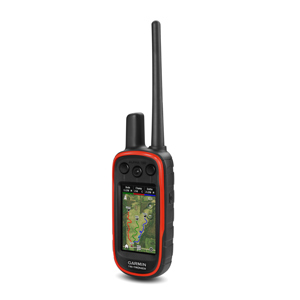
As a houndsman chasing big game like bear or lion across rugged terrain, you need gear that keeps up with your pack. The Garmin Alpha XL, a vehicle-mounted GPS dog tracking and training system, is built for serious hunters, offering a 10” touchscreen, the ability to track up to 20 dogs, and robust navigation tools. Whether you’re navigating dense forests or training hounds in the field, this guide provides practical tips to get the most out of your Garmin Alpha XL, ensuring you stay connected and in control during every hunt. Available at Double U Hunting Supply, explore the system here or finance it with zero-interest options here.
Step 1: Set Up Your Garmin Alpha XL for Quick Deployment
Getting started with the Alpha XL is straightforward, making it ideal for houndsmen eager to hit the field.
Unbox and Mount: Connect the power adapter and attach the included magnetic roof mount antenna. Use the windshield mount for quick setup or the dash mount for a permanent install in your truck or side-by-side. A direct wire option (sold separately) ensures continuous power, avoiding power port shutoffs in newer trucks.
Power On: The 10” touchscreen boots up in seconds, displaying a bright, sunlight-readable interface similar to the Alpha 300, familiar to seasoned Garmin users.
Tip: Before heading out, fully charge the device and test the mount’s stability to avoid disruptions during fast-paced hunts.
Step 2: Pair Collars for Seamless Tracking
The Alpha XL pairs with compatible Garmin collars (e.g., TT25, T20, TT15X, T5X) using a Phillips screw connection, supporting up to 20 dogs with a 1-3 mile real-world range (compared to Garmin’s 9-mile line-of-sight claim).
Pairing Process: Navigate to the “Track and Control” menu, select “Add Dog,” and enter the collar’s track code. For existing setups, the Alpha XL is backward compatible with most Alpha collars, like TT15 or T5.
Organize Groups: Save up to 250 dogs in the device’s memory, creating groups (e.g., “Bear Pack”) for easy switching between hunts. This is perfect for houndsmen managing multiple dogs across seasons.
Tip: Use vibrant collar colors (available at Double U Hunting Supply) to visually identify dogs in the field, matching them to the Alpha XL’s color-coded tracking display.
Step 3: Optimize Navigation for Big Game Terrain
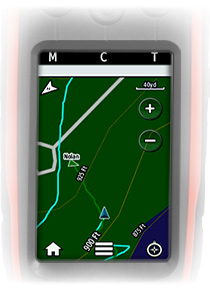
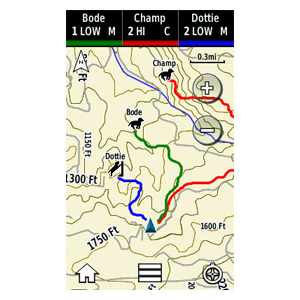
The Alpha XL’s preloaded TopoActive maps, street maps, and satellite imagery make it a navigation powerhouse for big game hunting.
Select Maps: Choose TopoActive for rugged terrain or satellite imagery for a detailed view. Subscribe to Outdoor Maps+ or use HuntView Plus SD cards for premium hunting maps with landowner data.
Simplify Layers: The Map Layers menu can feel overwhelming with options like POI or PLSS. Stick to essentials—Topo, satellite, or landowner maps—for quick navigation.
Tip: Use pinch-to-zoom and map rotation to focus on key areas, like ridgelines or water sources, where hounds may tree game. Download maps via Wi-Fi before heading into remote areas.
Step 4: Train Effectively During Hunts
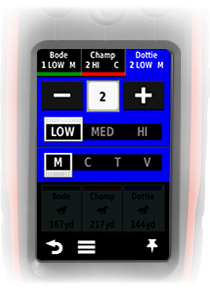
With 18 levels of stimulation, tone, and vibration (collar-dependent), the Alpha XL doubles as a training tool, accessible directly from map and compass pages.
Access Training Pages: From the tracking screen, tap a dog’s icon to open training controls. Adjust stimulation for corrections or use tone for obedient hounds.
Customize Settings: Start with low stimulation for sensitive dogs, increasing as needed for hard-headed hounds chasing big game.
Tip: Practice training commands in low-pressure settings before hunts to ensure dogs respond reliably in the field.
Step 5: Monitor Hunt Metrics and Avoid Interference
The Alpha XL provides valuable insights to evaluate your pack’s performance, crucial for big game houndsmen.
Track Metrics: Monitor speed, distance traveled, and time afield via the Hunt Metrics feature to assess dog stamina and strategy.
Avoid Interference: Use the Channel View to select clear frequencies, preventing signal conflicts in busy hunting areas.
Tip: Pair with the Garmin Alpha app for smartphone integration, allowing backup tracking if you step away from the vehicle.
Step 6: Address Software and Usability Challenges
While the Alpha XL is powerful, some users note its interface can feel complex due to icon-heavy menus.
Simplify Navigation: Focus on core functions (tracking, training, maps) to avoid menu overload. Garmin’s software updates are expected to streamline usability.
Tip: Clear dog tracks manually if the process feels unintuitive by selecting “Reset Track” in the dog’s profile. Check Double U’s blog at Double U Hunting Supply for updated tips.
Why Choose the Garmin Alpha XL from Double U Hunting Supply?
The Garmin Alpha XL is a must-have for houndsmen tackling big game in challenging terrains. Its rugged design, large touchscreen, and reliable tracking make it a trusted companion. At Double U Hunting Supply, we use what we sell, ensuring field-tested quality. Explore the Alpha XL or finance it with zero-interest options here to gear up for your next hunt. Fast shipping and a 60-day return policy (unused, unopened) keep you focused on the chase.
Big game houndsmen have been asking for a larger truck mount screen for some time and this year (2016) Garmin delivered with the release of the Drivetrack 70. The Double U Hunting Supply team was very pleased with the many usable features built into the DriveTrack 70. Of course we enjoyed how easy it was for us to get our collars linked up and back into the field. Once in the field we found the 7’ screen bright and easy to read with either our favorite the 24k map, or with the 100K topo map that comes included. We hadn’t utilized the free 1 year Birdseye View subscription that is provided by Garmin with the Alpha 100 in the past simply because of the small screen. However, we did find the free 1 year Birdseye View far more useful with the Drivetrack 70.
DriveSmart 70, Standard Views, UNITED STATES
The new Garmin Drivetrack 70 boast many of the conveniences of a standard GPS navigation system with one major difference, the ability to show your linked collars, up to 20 collars, on the 7’ screen with detailed TOPO maps. One of the Major differences between the DriveTrack 70 and other Garmin navigation devices is the ability to display topographical maps, as well as your dogs location. With the DriveTrack 70 you can choose between street maps, Birdseye View, TOPO maps or simply install any Garmin compatible map by inserting the microSD card into the DriveTrack 70. This includes our favorite the 24K or the popular landowner maps. We found that the TOPO maps provided plenty detail in our area while in the field. However, while using the Drivetrack 70 as a navigation device we found “street maps” to be far more useful while navigating to hotels, diners and especially fuel stations during a recent trip.
Although we understand most of our customers simply want to track their dogs on a larger screen, not fiddle around with computers, tablets and a bunch of wires hanging all over the place, we found the DriveTrack 70 to be a great 2 for the price of one type of product. We recently had one of our field testers who is not one of our most “tech savvy” guys accompany us on an out of town trip. He was able to quickly learn how to navigate between screens perform searches and navigate to and from points of interest. In fact, he commented that “the Drivetrack 70 is every bit as useful in town as it is up Lookout Butte. In fact, maybe a bit more useful in town because it helps me get the heck out of town faster.”
As with many new product releases by Garmin, the DriveTrack 70 boldly goes where no other product has gone. Sure, there have been attempts to get GPS tracking onto a bigger screen but only one has ever gained much traction and is the GPS Dawg. Essentially what the GPS Dawg device does is combine the free software provided by Garmin called “Base Station” to a refurbished tablet. Once paired with a Garmin handheld device using a USB cable, and several other steps the user is then able to share information through the handheld to the tablet. We found this process to be somewhat complicated and not “user friendly”. Once we got everything configured, we found mounting the tablet to be a whole new issue. We considered mounting the tablet in the window but feared it would overheat from the sun beating down on it through the window. Next we looked at a console mount but had to reconsider when we noticed all the coffee stains in, on, and around the console. Our options to mount the tablet were further complicated by the fact that we had to continuously swipe the screen on the tablet in order to keep our dogs on the screen. Although we did find value in the paired tablet system, things like the ability to do updates on our tracking equipment in the field, receive and send emails and on one occasion downloading a how to fix your RV heater video from youtube, the Double U Hunting Supply team didn’t feel comfortable endorsing the product because of price (between $500 and $800.00 depending on unit size), dependability, lack of user friendliness and a poor overall user experience.
Having a computer engineer on the Double U Hunting Supply team we decided to make our own run at building a larger screen unit for our customers. We explored every option we could come up with but ultimately ended up going down the same path as GPS Dawg. Initially, it was straight forward from a “tech geek” point of view, until we got to the point of downloading maps. Finding a map that would run smooth proved to be difficult, at which point we abandoned the project. We simply felt the system was a failure on too many levels to receive a green light from the Double U Team. At this point we turned to our friends at Garmin and shared with them some ideas that we felt would be in solid demand. Following what seemed like an eternity, we are pleased to finally give the Double U Hunting Supply endorsement to the Garmin Drivetrack 70.
So what sets the new Garmin DriveTrack 70 apart from other larger screen attempts? Well as mentioned before you get the very easy “plug and go” setup along with the fact that you get wireless communication between the Drivetrack 70 and either the Astro 430 or an updated Alpha 100, built in 100K Topo Mapping, 1 year Free subscription to Birdseye View mapping, free lifetime Street Mapping, as well as the ability to load maps through the microSD card slot (including our favorite 24K map or the popular land-owner microSD card), a convenient window mount is included, Auto Zoom, on screen alerts, a highly functioning navigation device, bluetooth capabilities all for $399.99 and backed by Garmins 1 year warranty you can’t really go wrong.
Pro’s:
Built in Topo 100K maps are included.
Easy to connect, virtually turn on the device along with your handheld and your dogs start showing up on the screen.
Built in options to follow the dogs in the race, the unit zooms in or out to keep all your dogs in view so you can follow the race.
Free Birdseye 1 year subscription.
Navigation works well.
Hands free Cell Phone Calling.
With all that said what do we feel Garmin could have done better. One of our first issues with the Drivetrack 70 is it only tracks on the screen while it is actively paired with the new Astro 430 or an updated Alpha 100. If the power is interrupted, or if you turn off either of the paired units you will lose all your tracks up to that point. Essentially you will start a new hunt on the DriveTrack from that point forward. It currently does not save the Tracks. Also, we felt a stand alone unit would have been the better choice. We feel the customer would have been better served had the unit been designed with the ability to track your dog without being linked to a handheld. Our idea of the perfect vehicle mounted tracking device would have been on a 7” screen platform much like the DriveTrack 70, however it would have the capability to be attached to a truck mount antenna, serve as a hub for mass information transfer for things like dog tracking information. Imagine how handy it would be for the handler if he was planning to hunt with another pack if all he had to do is scroll to the “share all dog” info icon and press “share wirelessly” and presto your info is shared to your hunting partners paired Drivetrack device, or if you happen to lose your handheld unit and needed to replace it. You would simply pair the handheld to your truck mount unit and share all dog info to your new unit. We have on several occasions received calls from customers hoping to reconnect to a collar that is on a dog in the field. Most of these calls come from customers who had set their handheld down during a hunt and couldn’t locate it. Currently, the only way to reconnect is to have your tracking numbers saved on another handheld or to write them down. Had these handlers had a truck mount unit that automatically syncs with the handheld and transfers mass information all they would have had to do is get another unit, pair it and get back to hunting.
Summarized Con’s :
Not a stand alone unit, does not easily allow for an external truck mount antenna.
Tracks are only on the screen while you are connected, If you have to turn off the device or re-pair the handheld you will start a new track and lose your previous tracks. You can not save your tracks on the device.
Could have added more helpful features for hunters with larger packs as a stand-alone unit
How does the device compare to Other Larger Screen options for your Pickup.
Price Comparison:
Drivetrack 70: Cost 399.99. 7 Inch Screen wireless communication with Alpha 100 Or Astro 430
VS.
Tablet with Base Station: 399.99 up to $800 The Value tablet 8 inch for 399.99, or the Pro 8 inch tablet for 549.99. Prices can go up to 800 for an 11 inch tablet.
We feel the price of 399.99 for the DriveTrack is priced accordingly -You might be able to find other options using Base Station that are similar or slightly lower in price than the DriveTrack 70. However, for the value it will be difficult to accomplish an out of the box working unit for the price of 399.99. We should also mention you might be able to build a Tablet system yourself for less money than a DriveTrack. However, by the time you purchased Maps and Mounts,the cost would be approximately the same. It would also take a considerable amount of time and experience with computers to set it all up.
Ease of setup and use Comparison:
The DriveTrack 70 wins handily compared to all of the windows tablets, Simply Turn on the Alpha/Astro 430 and the DriveTrack and the unit starts picking up the dogs in your dog list. When using a Tablet you’ll need to connect the Alpha/Astro to the Tablet using USB cable, and start and run Base Camp program on your computer to display and show the dogs and You’ll also need to install maps on your tablet before you can view maps on your tablet. We found that mounting a Tablet in your truck was difficult to find a good place due to size.
Comparing Features of the DriveTrack VS. Tablet with Basestation:
Comparing Features is difficult. The features that each have are different. The DriveTrack has more features regarding Navigation, Turn by Turn Directions, and pairing to your Cell phone. With the Drive Track it’s simple to search and find addresses, waypoints or points of interest (Food, Hotels, Gas stations).
The strong points about the Tablet systems, these are essentially mini computers which allow you to run any software you would normally run on a computer. For example you can receive emails and perhaps the most useful feature is the ability to update your Garmin Devices software. (Today I’m flying at 30,000 and I now use my BaseStation device for Traveling, hence I’m typing this review on my “Basestation Tablet Unit”) In summary, it really depends on what and how you will use it, If you really use and need a Tablet/computer for travel then there are situations that a Base Station Tablet could be more useful, If your device is strictly for the Truck then I would recommend the DriveTrack.
In summary, if you want or need a Mini Computer for email, software updates, and etc., you might consider a Tablet. For most of us we want a dedicated platform to the truck it makes a lot more sense to get the DriveTrack 70, the features with the DriveTrack 70 help with navigation and turn by turn directions.
Mapping Comparison:
DriveTrack 70 Maps: The DriveTrack built in 100K Topo Maps for the entire US, included is also lifetime Street maps. If you use birdseye you receive a 1 year free subscription to Birdseye Satellite Imagery. The DriveTrack has a Micro SD card slot so that you can put any Garmin Compatible Map chip in it and easily upgrade to 24K, Hunt View, or Landowner maps within seconds.
Tablet: Basestation maps are not included with the tablets, however some of the Bundle packages include one state of 24K Maps included. You’ll need to install the maps on your tablet before you go hunting. To do this you will need to connect to internet and find a downloadable map. This can be time consuming and confusing for some houndsmen.
Clearly the Drivetrack wins the mapping section, When you purchase the DriveTrack 70 you’ll have all the maps you need ready out of the box, Topo, Street, and even Satellite imagery(By Subscription) included. Also Installing other Maps on the driveTrack is much more simple with the MicroSD card compared with a windows tablet.
Durability against Heat when mounted to a windshield:
Drivetrack 70 is designed for the Windshield, Garmin heat tests their navigation devices to withstand with the hottest days while the device is mounted and left in your windshield, we personally tested them in AZ with 106 degree days driving and experienced absolutely no issues at any time from Hot or Cold. We have been informed by Garmin, that in the worst case situation, their devices are designed to discharge the battery for safety reasons if the device get’s too hot. Clearly, Garmin has put some thought into where and how this device is going to be mounted. Garmin claims -4 to 131 Degrees Fahrenheit.
How do the Tablets Compare: Google the term “Dell Venue Pro 8 Tablet Overheating”, and you can read about these tablet’s susceptibility to overheating under normal usage. Now imagine mounting this to your windshield on a warm day. Computers are very susceptible to heat and they are not built to stand the harsh conditions mounted to a windshield. Tablets/Computers will slow down their processors when they get hot which will drastically slow the performance. They can also stop working and have permanent damage in hot environments. If anyone has left their Tablet or phone in a ar we have all seen the screen that shows the device is too hot to use. Specs for the Dell Tablets for example are 32-104 which is much less forgiving of the Harsh environments.
Conclusion:
In conclusion, our suggestion is clearly with With the Drivetrack 70. It was too simple to operate, turn on your handheld and turn on the DriveTrack 70. Our customers want to hunt dogs, not try and figure out how to setup and operate these devices. After a minute or two you should have your dogs showing and tracking on the screen with Roads and Topo Maps. The DriveTrack is easy to understand and simple use. Also, Garmin Priced the Drivetrack right at 399.99 saving money in the long run by including Maps and lifetime street updates. The Headaches and time users will save quickly cover any small savings that a person would make by trying to piece together a lower cost Tablet system.
Purchase a Drivetrack 70, You find out it’s easy to get it up and running, and your days of Driving down a Dusty Dirt road during a race, straining to keep up with the dogs will be a thing of the past. The passengers in your truck will also appreciate and can witness the chase from their seats as well.
The Garmin TT 15 track and train dog device with collar is a top-mounted, high-sensitivity GPS/GLONASS receiver that uses 18 levels of continuous and momentary stimulation plus audible tone and vibration activated from the Alpha® 100. Compatible with the Astro® 320 for tracking only.
Rugged and water resistant to 10 meters, this tracking and training dog device is tough enough to run wherever your dog runs, up to 9 miles away. The stimulation features let you train each dog separately — traditional stimulation allows you to make quick changes (low, medium or high) within a predetermined stimulation level (1-6) whereas linear stimulation allows progressively more stimulation from levels 1 to 18.
TT 15 units, when sold separately, ship with a 1-inch red collar strap. Replacement straps are available in multiple colors (sold separately).
Physical & Performance
Unit dimensions (WxHxD): 3.5″ x 1.75” x 1.85″ (7.8 x 4.4 x 4.4 cm)
Weight: 7.3 oz (207.0 g) for transmitter and antenna; 10.0 oz (284.0 g) total weight
Battery life: 24-48 hours
Battery type: rechargeable lithium-ion pack; user replaceable
Interface: USB
Water rating: 1 ATM (10 meters)
High-sensitivity GPS/GLONASS receiver: Yes
GPS antenna: top, black
Stimulation/Vibration/Tone: Yes
LED beacon lights: Yes
Rescue mode: Yes
Frequency mode: MURS (The T 5 and TT™ 15 are only compatible with the Astro® 320 and the Alpha™ 100. The T 5 and TT 15 can be configured for operation with either handheld but cannot be tracked simultaneously by both the Astro 320 and the Alpha 100)
Garmin® Introduces New Collars for Astro® and Alpha® Dog Tracking and Training Systems
12 June 2014 @ 6:00 AM / Outdoor/Fitness /
OLATHE, Kan. /June 12, 2014/Business Wire — Garmin International Inc., a unit of Garmin Ltd. (NASDAQ: GRMN), the global leader in satellite navigation, today announced two new GPS-enabled collars, the TT 15 and T 5, for its industry-leading Astro and Alpha dog tracking and training systems.
“These new collars give sporting dog owners what they’ve been asking for – things like better satellite reception and optional vibration in a rugged design,” said Dan Bartel, Garmin’s vice president of worldwide sales. “These new devices demonstrate the commitment by Garmin and Tri-Tronics to continue innovating in the sporting dog market.”
The new TT 15 dog device allows you to track and train sporting dogs up to nine miles away. New in this unit is the addition of GLONASS satellite technology. When using GPS and GLONASS satellites together, sporting dog owners will spend less time waiting for the collar to acquire satellites before the hunt, and the collar will better maintain its location even in heavy cover and deep canyons during the hunt.
The TT 15 also adds a vibration stimulation option, to match individual dogs’ temperament. Incorporating vibration into a training plan is also an ideal way to silently issue a command to a dog. Like previous models, the TT 15 has 18 levels of continuous or momentary stimulation, as well as tone. Battery life varies from 24 to 48 hours, depending on the user-specified update rate.
For hunters who want a dog’s perspective of the hunt (third-party mounting harness sold separately), they can pair the Garmin VIRB™ high-definition action camera with the TT 15 and control it remotely from the Alpha 100 handheld.
The T 5 is a tracking-only version of the TT 15. The T 5 has the same GLONASS compatibility, without any stimulation capability. Both the TT 15 and the T5 are compatible with the Alpha 100 or the Astro 320 handhelds. Tracking, but no stimulation, is possible when pairing the Astro 320 with the TT 15.
These collars are sold in two new bundles. The Astro bundle contains an Astro 320 and T 5, while the Alpha bundle contains an Alpha 100 and a TT 15. New to the Alpha bundle is an included one-year subscription to high-resolution BirdsEye Satellite Imagery, which depicts aerial views of trees and man-made structures. The new collars are also sold separately as an upgrade to existing Astro and Alpha systems, but users must download a free software update to their handheld before pairing the new collar by visiting www.garmin.com/webupdater. The new devices are expected to be available in July 2014.
The TT 15 and T 5 are the latest innovations in Garmin’s growing outdoor segment, which focuses on developing technologies to enhance users’ outdoor experiences and their relationships with their canine companions. Whether it’s hiking, hunting, golfing, geocaching, dog training, or capturing it all on video, Garmin devices are essential tools for outdoor enthusiasts of all levels. For more information about Garmin’s other outdoor products and services, go to www.garmin.com/dogs, www.garmin.blogs.com and http://twitter.com/garmin.
About Garmin International Inc. Garmin International Inc. is a subsidiary of Garmin Ltd. (Nasdaq: GRMN), the global leader in satellite navigation. Since 1989, this group of companies has designed, manufactured, marketed and sold navigation, communication and information devices and applications – most of which are enabled by GPS technology. Garmin’s products serve automotive, mobile, wireless, outdoor recreation, marine, aviation, and OEM applications. Garmin Ltd. is incorporated in Switzerland, and its principal subsidiaries are located in the United States, Taiwan and the United Kingdom. For more information, visit Garmin’s virtual pressroom at www.garmin.com/pressroom or contact the Media Relations department at 913-397-8200. Garmin, Tri-Tronics, Astro, and Alpha are registered trademarks of Garmin Ltd. or its subsidiaries.
Notice on Forward-Looking Statements:
This release includes forward-looking statements regarding Garmin Ltd. and its business. Such statements are based on management’s current expectations. The forward-looking events and circumstances discussed in this release may not occur and actual results could differ materially as a result of known and unknown risk factors and uncertainties affecting Garmin, including, but not limited to, the risk factors listed in the Annual Report on Form 10-K for the year ended December 28, 2013, filed by Garmin with the Securities and Exchange Commission (Commission file number 0-31983). A copy of such Form 10-K is available at http://www.garmin.com/aboutGarmin/invRelations/finReports.html. No forward-looking statement can be guaranteed. Forward-looking statements speak only as of the date on which they are made and Garmin undertakes no obligation to publicly update or revise any forward-looking statement, whether as a result of new information, future events, or otherwise.
FCC Notice:
The T 5 and TT 15 GPS-enabled collars have not been authorized as required by the rules of the Federal Communications Commission. These devices are not, and may not be, offered for sale or lease, or sold or leased, until authorization is obtained.
Garmin, the global leader in dog GPS track and train technology, just announced the newest updates to their dog tracking platform. The Garmin TT15 / Garmin T5 GPS dog tracking collars. By simplifying their product line, this allows hunters a simple choice between a track and train (TT15) collar, or a track only (T5) collar. The customer can use either collar on both the Astro 320 or Alpha 100; however they will not track on both at the same time. It should also be noted the training features of the TT15 are disabled while paired with the Astro 320.
With a list of features that include GPS/GLONASS capable, new training options, bark detection, LED beacon lights, rescue mode, and the ability to turn on/off your VIRB camera at long distances, we feel our customers will be equally excited. The two TT15 / T5 features that the Double U Hunting Supply team is most excited about are the, “choose your system” feature available on both the TT15 and the T5. This allows the TT15 / T5 to be tracked on either the Astro 320 or the Alpha 100. Second is the vibrate training mode that is available only on the TT15 while it is paired to the Alpha 100.
“The best part about the way Garmin is moving with this product model is having the ability to offer our customers a way to upgrade into the track and train abilities of the Alpha 100 system one collar at a time, without having to purchase a whole new system all at once”. “For a few more dollars our customers can progress towards the Alpha 100 system each time they purchase a new collar,” says Buddy from the Double U Hunting Supply team.
Because not all features are available on both the TT15 and the T5 and some features are disabled while linked to an Astro 320, we encourage our customers to check out the comparison charts below to make sure you get the collar that is the best fit for your needs.
The Garmin T5 Tracking collar will be available individually for $249.99 or can be bundled with a Astro 320 T5 Bundle for 599.99.
You can purchase the Garmin TT15 individually for 299.99, or bundled in the Alpha 100 TT15 combo package for 799.99.
For a more detailed description of the features available on the Garmin TT15 and Garmin T5, visit please read our review at DuSupply.com If you have any questions, feel free to contact our knowledgeable staff at 855-384-8687.
Many Users have experienced issues with the Alpha not showing the tree indication while using their TT10 collars. The Issue was isolated to the Northern states. By Updating you TT10 with the 2.7 software you will see your Alpha Show the Collars with the Treed Icon on your screen when the dogs stop or tree in the field.
For more information about the Garmin Alpha TT10 collar or to view all the information and technical links to the Software Visit http://www.dusupply.com/garmin-alpha-collar-tt10.html
A few Improvements with the Garmin Alpha 100 Compared to the Garmin Astro
Rescue Mode. – Automatically Lowers the update rate after the collar battery reaches a certain Level. (Suggested to Garmin by Yours Truely)
Preloaded with 100K topo Maps
Track up to 20 Dogs
Improved Battery Life
Track other Garmin Alpha Handhelds
Connect your Garmin Alpha to a computer for Live Laptop tracking with Basecamp.
Radius Alerts- Recieve an audio Alerts when a dog Leaves a radius that you choose
GEO Fence – Setup a area to define where you want to keep your dog inside, or if you want to be alerted when they enter a “forbiden” area. Great for Private property hunts where you dog might not know where he is or isn’t allow to hunt.
Introducing the Alpha 100
Tracking other Alpha 100 Handhelds.
Change Your update Rate
TT10 Collar video
What’s in the Box:
You can purchase the Alpha 100 in a bundle or as a stand alone receiver.
Alpha Bundle
GPS Track and Train System
Alpha 100 handheld
Rechargeable user-replaceable Li-ion pack
Belt clip
Extended range antenna
TT™ 10 dog device with orange collar strap
Charge clip
AC adapter
Vehicle power cable
Split adapter cable
USB cable
Short and long contact point set with wrench and non-stim plug
Durable field bag
Manuals
Alpha 100
GPS Track and Train Handheld
Alpha 100 handheld
Rechargeable user-replaceable Li-ion pack
Belt clip
Extended range antenna
AC adapter
Vehicle power cable
USB cable
Split adapter cable
TT 10
GPS Track and Train Dog Device
TT 10 dog device with black collar strap
Charge clip
AC adapter
Vehicle power cable
User-replaceable contact points set (short and long) with wrench and non-stim plug
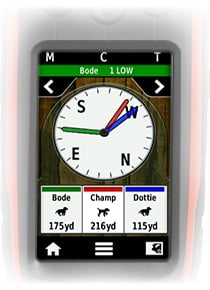
Track and Train 20 Dogs. From the compass screen, get in-depth speed, direction traveling and distance away information for any dogs you’ve selected. And correct any dog on this screen without falsely correcting the others.
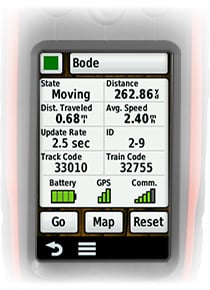
At-A-Glance Dog Stats. Get the information you always need, like your dog’s state (moving or on-point/treed), distance from the Alpha device, total distance traveled, speed and update rate, all on 1 screen.
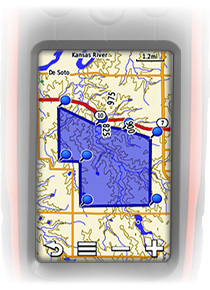
Keep ‘em Away From Hazard. Don’t wait till your dog is lost or in danger to get him back. Setup virtual boundaries on your map and receive an alert if he strays out of your geofence so you can recall him right away.
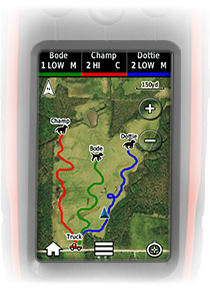
Your Own Birds Eye View. Track and train up to 3 dogs based on where they are with BirdsEye Satellite Imagery. These highly-detailed raster maps provide a realistic bird’s eye view of roads, parking areas, buildings, and terrain, including tree lines, lakes, rivers and streams. They are a great way to supplement the comprehensive topographic maps on your Alpha.
Keep Your Dogs On Track. From the training screen, correct and recall multiple dogs (with extra TT 10 devices) with the help of Tri-Tronics electronic training. Select traditional or linear progression plus tone or stimulation types.
Keep Up With Your Buddies. Know where other hunters in your group are. Set your Alpha to show not only the dogs in your group, but also the other Alpha handhelds too (Up to 20 TT 10 or Alpha units. Not compatible with Astro).
Professional Tracker. Professional Trainer.
Glove-friendly 3” color touchscreen
Preloaded 100K U.S. TOPO maps
Electronic compass
Barometric altimeter
Hunter-to-hunter position reporting with preset messaging capability
Using the Alpha 100, you can measure each dog’s speed, distance and the direction being traveled. Plus, you can receive notifications when a dog is “Treed” or “On Point.” A single Alpha 100 can track up to 20 dogs or fellow hunters when using either additional Alpha 100 handhelds or TT 10 devices (each sold separately, not compatible with Astro®).
Train and Control Your Dogs
Alpha 100 helps you train and control them to stop chasing unwanted game or “recall” to your position. Easy to access training buttons allow you to communicate separately to each dog through safe and effective features, including 18 levels of momentary and 18 levels of continuous stimulation or an audible tone command. Plus, a lockout setting is available to avoid accidental stimulation or tone.
Two modes of level progression let you customize your training even further. Traditional stimulation allows you to make quick changes within a predetermined stimulation level (low, medium or high). Whereas linear stimulation allows progressively more stimulation through all 18 levels available.
Extend Your Battery
When using the TT 10, hunters can switch to Rescue Mode to prolong the battery life. When the TT 10 reaches a certain battery level, it will slow down the update rate at which it pings the Alpha 100 from every 2.5 seconds to every 2 minutes. This mode should provide additional battery life to the TT 10, giving you more time to search for and locate your dog.
Physical & Performance:
Unit dimensions, WxHxD:
2.5″ x 6.5″ x1.5” (6.4 x 16.5 x 3.8 cm)
Display size, WxH:
1.5″ x 2.6″ (3.8 x 6.3 cm); 3″ diag (7.6 cm)
Display resolution, WxH:
200 x 400 pixels
Display type:
transflective, 65-K color TFT touchscreen
Weight:
8.8 oz (250 g) with standard antenna and battery
Battery:
rechargeable lithium-ion (included)
Battery life:
up to 20 hours (Alpha 100)
Waterproof:
yes (IPX7)
Floats:
no
High-sensitivity receiver:
yes
Interface:
USB
Maps & Memory:
Basemap:
yes
Preloaded maps:
yes (topographic)
Ability to add maps:
yes
Built-in memory:
4.0 GB, 500 MB available for user storage (with topo maps loaded)
Accepts data cards:
microSD™ card (not included)
Waypoints/favorites/locations:
4000
Routes:
200
Track log:
10,000 points, 200 saved tracks
Features & Benefits:
Automatic routing (turn by turn routing on roads):
Double U Hunting Supply is the first to introduce Replacement Antennas for the Garmin Alpha Collars. At this time Garmin does not offer a factory Replacement antenna for the new TT10 Collars. The only way to replace the Antenna is to Send it back to Garmin for a repair charge. Double U has to Special order and custom build these antennas that will fit and work with the Garmin TT10 tracking collars.
Our antennas are made with stainless steel, and have a Bright Protection coat that increases Visibility. These antenna’s are built by the Tuff Skin antenna standards and have the same great range that the Factory Garmin Alpha Collar Antennas have.
You can also use this antenna’s on the DC40 and DC30 antennas as is, they perform as well as Double U Hunting Supply’s “stainless Steel” tuff skin antennas, but have a florescent bright color to increase visibility.
Alpha allows you to track up to 20 dogs or buddies (TT units or Alpha units) by adding them to your tracking list. Train 3 dogs at a time with separate levels or modes of stimulation for each. See when your dogs are moving or on-point or treed. Learn More
This durable field bag is just what you need to keep all of your tracking and training devices in one spot. Made with black and gray polyester, this zippered bag with an inside mesh pocket is big enough to house multiple Alpha™, TT™ 10 and associated accessories. Learn More
These screen protectors reduce sunlight glare on the Alpha™’s display, minimize fingerprint smudges and protect against scratches. Includes 3 per package. Learn More
Let the charging begin! Simply snap your TT™ 10 to our charging clip when not in use to recharge your battery. The power cable (sold separately) is plugged into the mini USB port on the side of the charging clip. Note: You must remove the clip before using the device. Learn More
Get the most out of your device with our USB cable. Create routes and waypoints on your personal computer and transfer them to your device using the USB cable. On compatible devices, use the USB cable to transfer photos and music and turn your device into a portable photo album or music player. You can even use the USB cable to charge your device! Learn More
Don’t get stuck without either of your tracking or training devices while on the hunt. Our split adapter cable allows you to recharge your Alpha™ and TT™ 10 devices in your vehicle at the same time. Or, you can use it to charge 2 devices (Alpha 100 and/or TT 10) from a single cigarette lighter receptacle or single AC adapter. Learn More
Power and recharge your Alpha™ and TT™ 10 dog tracking and training devices from any standard U.S. wall outlet with this replacement adapter cable. Learn More
Power up while you’re on the go with this 12 V adapter. It’s your in-vehicle charger when you’re on the trail. Plugs into any standard cigarette lighter receptacle. Learn More
There are two training stimulation modes for the Alpha 100, linear and traditional.
1. Linear: Has levels 1 through 18. 1 being barely noticeable and 18 being severe
2. Traditional: Has levels 1 through 6 with high, medium, and low options for each level. 1 low being barely noticeable and 6 High being severe.
With the Garmin Alpha regarding correction (shock) level, you have the option to select linear and traditional modes which basically give the same stimulation levels.
Linear Mode is more straight forward and easier to understand with levels 1-18
Traditional being a little more confusing for some. This is due to the L, M, H option for each of the 6 levels. For example as the chart below indicates, a 3 with the linear mode would be the same stimulation as a 1 high on the traditional mode, and a 13 on the linear mode would be the same stimulation as a 5 low on the traditional mode.
Double U recommends to use the linear Training mode to eliminate any and all confusion. The chart below illustrates the similarity and comparisons of the two(shock) modes.
For more information on where To Buy your Garmin Alpha System
Alpha allows you to track up to 20 dogs or buddies (TT units or Alpha units) by adding them to your tracking list. Train 3 dogs at a time with separate levels or modes of stimulation for each. See when your dogs are moving or on-point or treed. Learn More
Alpha allows you to track up to 20 dogs or buddies (TT units or Alpha units) by adding them to your tracking list. Train 3 dogs at a time with separate levels or modes of stimulation for each. See when your dogs are moving or on-point or treed. Learn More
Press and hold your finger on the upper left side of the display
Power on the device
Wait to see Do you really want to erase all user data?
Release your finger from the upper left side of the display
Touch Erase
Allow the device up to 20 minutes to acquire satellite data with a clear view of the sky
The device is now reset and ready for use.
How to Perform a Master Reset the TT10 Collar
If the Alpha TT 10 collar is failing to operate as expected, corrupt data may be the cause. Performing a master reset will reset the collar to factory settings and clear data resolving issues caused by corrupt data.
To perform a master reset on TT 10:
Ensure the device is powered off
Connect charging clip to collar
Connect USB cable to collar and computer
Ensure collar light is active to confirm connection
Firmly press the Power button 4 times
Wait for light to turn green then red
Disconnect USB cable and charging clip from collar
Reference Owner’s Manual to remove old collar information
Reference Owner’s Manual to re-pair the collar
The collar has now been reset and is ready for use.
Information provided courteous of DuSupply.com For more Troubleshooting and information about the Garmin ALPHA 100 systems, Please see Double U Hunting supplies



 DriveTrack 70. This includes our favorite the 24K or the popular landowner maps. We found that the TOPO maps provided plenty detail in our area while in the field. However, while using the Drivetrack 70 as a navigation device we found “street maps” to be far more useful while navigating to hotels, diners and especially fuel stations during a recent trip.
 As with many new product releases by Garmin, the DriveTrack 70 boldly goes where no other product has gone. Sure, there have been attempts to get GPS tracking onto a bigger screen but only one has ever gained much traction and is the GPS Dawg. Essentially what the GPS Dawg device does is combine the free software provided by Garmin called “Base Station” to a refurbished tablet. Once paired with a Garmin handheld device using a USB cable, and several other steps the user is then able to share information through the handheld to the tablet. We found this process to be somewhat complicated and not “user friendly”. Once we got everything configured, we found mounting the tablet to be a whole new issue. We considered mounting the tablet in the window but feared it would overheat from the sun beating down on it through the window. Next we looked at a console mount but had to reconsider when we noticed all the coffee stains in, on, and around the console. Our options to mount the tablet were further complicated by the fact that we had to continuously swipe the screen on the tablet in order to keep our dogs on the screen. Although we did find value in the paired tablet system, things like the ability to do updates on our tracking equipment in the field, receive and send emails and on one occasion downloading a how to fix your RV heater video from youtube, the Double U Hunting Supply team didn’t feel comfortable endorsing the product because of price (between $500 and $800.00 depending on unit size), dependability, lack of user friendliness and a poor overall user experience.

 Comparing Features of the DriveTrack VS. Tablet with Basestation:
 How do the Tablets Compare: Google the term “Dell Venue Pro 8 Tablet Overheating”, and you can read about these tablet’s susceptibility to overheating under normal usage. Now imagine mounting this to your windshield on a warm day. Computers are very susceptible to heat and they are not built to stand the harsh conditions mounted to a windshield. Tablets/Computers will slow down their processors when they get hot which will drastically slow the performance. They can also stop working and have permanent damage in hot environments. If anyone has left their Tablet or phone in a ar we have all seen the screen that shows the device is too hot to use. Specs for the Dell Tablets for example are 32-104 which is much less forgiving of the Harsh environments.


 913-397-8200. Garmin, Tri-Tronics, Astro, and Alpha are registered trademarks of Garmin Ltd. or its subsidiaries.